
A SAM.gov search for contract opportunities is free and needs no login: go to SAM.gov Contract Opportunities, choose Search, set the domain to Contract Opportunities, then narrow with NAICS, PSC, set-aside, notice type and a response date range. The hard part is not finding the search box. It is knowing which of SAM.gov's searches you are in, what each filter really matches, and why a default search returns tens of thousands of notices you cannot bid on.
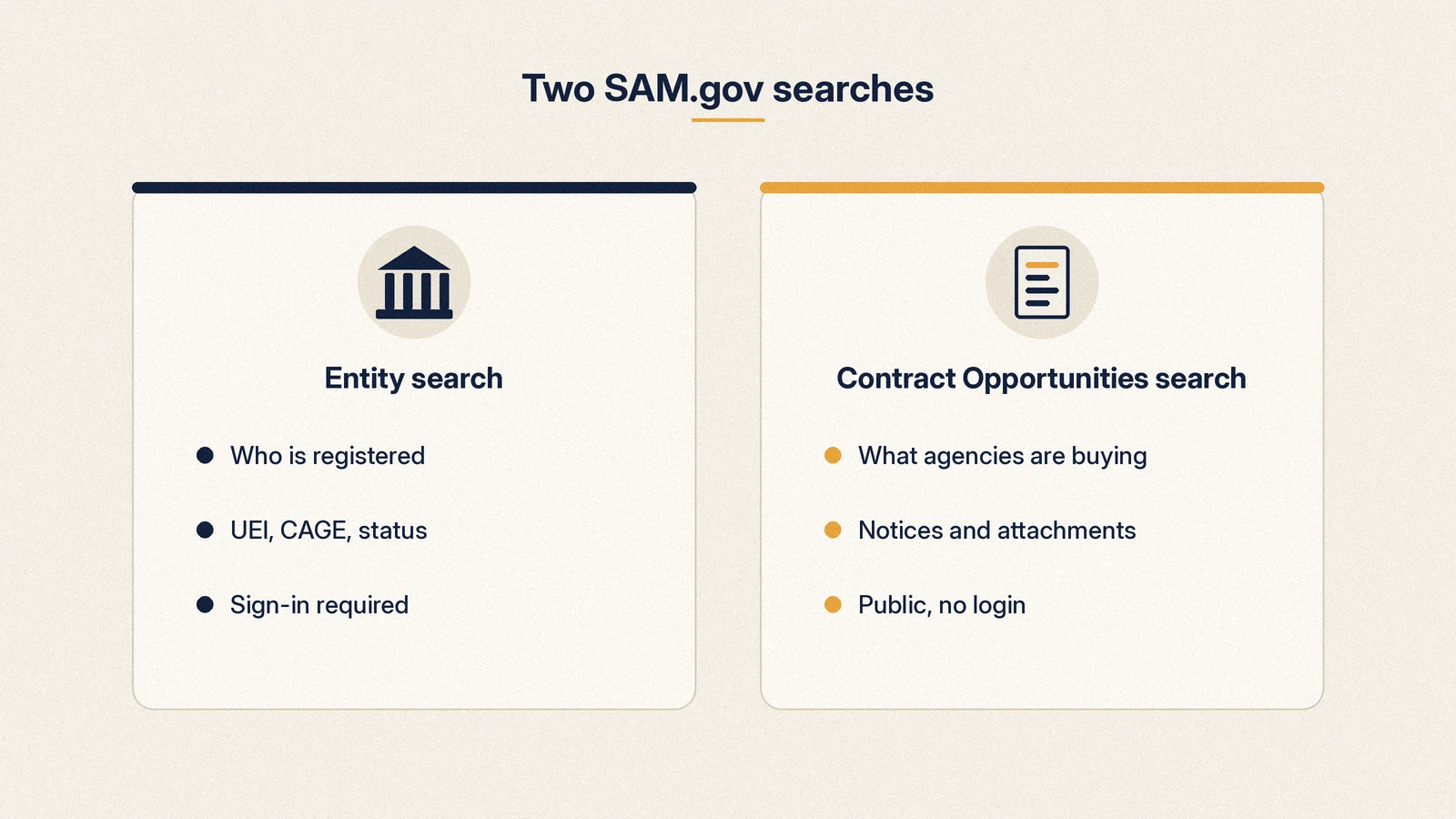
Two different SAM.gov searches, and which one you need
SAM.gov is one website with several data "domains": Contracting, Entity Information, Federal Assistance, Federal Hierarchy and Wage Determinations. The Federal Service Desk search guide (KB0017298) notes that "All Domains" is selected by default, so a keyword typed on the main search page can return an entity record, a wage determination and a contract notice in one mixed list. That is the first reason people think SAM.gov search is broken.
The two searches vendors actually need are very different tools.
| Entity search | Contract Opportunities search | |
|---|---|---|
| What it finds | Registered businesses: legal name, UEI, CAGE, registration status | Procurement notices: solicitations, presolicitations, sources sought, awards |
| Login required | Yes, for Entity Registrations and Entity UEI searches (KB0051464) | No (KB0029688) |
| Typical use | Check a teaming partner, find a competitor's UEI, confirm you show as active | Find work to bid on |
| Where to start | Search, then Entity Information domain | sam.gov/opportunities, or Search, then Contracting, then Contract Opportunities |
| Public exceptions | Only active exclusions are publicly searchable | Controlled attachments need an entity role |
The Entity Status Tracker is a third, narrower tool: it shows the registration status of entities linked to your own SAM.gov account, and you must be signed in. If you want to know whether a different company is registered, use entity search while signed in, or SBA's Dynamic Small Business Search for small business profiles.
The rest of this guide is about Contract Opportunities, which is what most people searching "sam gov search" are after.
How to run a Contract Opportunities search, step by step
- Open sam.gov/opportunities and select the search link, or choose Search in the header and pick Contracting, then Contract Opportunities in the domain list. The Contracting domain also holds Contract Awards, Subcontract Reports, Subcontracting Plan Reports and Other Transactions, so check you are in the right one.
- Leave Status: Active checked for now. SAM.gov defaults to active notices, and you can include inactive ones by unchecking it (KB0017599).
- Set Notice Type to Solicitation, Combined Synopsis/Solicitation and Presolicitation for bid-ready work. Add Sources Sought and Special Notice in a second search for early signals.
- Add NAICS and PSC codes under Product or Service Information. Prefixes work: the help article gives "23" for construction and "51" for hand tools.
- Add a Set Aside if you hold a certification, and Place of Performance if location matters.
- Open Dates and set Response/Date Offers Due from today forward. This one filter removes most of the noise.
- Sort by updated date when you review daily, so new notices and amendments rise to the top.
- Sign in and use Actions, then Save to keep the search (KB0029889).
You can paste a Notice ID straight into the keyword box, which is the fastest way to reopen a notice someone sent you.
Every filter and what it actually does
The left-hand panel shows a short set of filters. The More Filters dialog adds the rest, including Published Date, Inactive Date, Authority, Contract Award Details and Contract Office Details. Here is what each one matches, based on the FSD search article and the live search panel.
| Filter | What it matches | Practical note |
|---|---|---|
| Keyword Search | Words in the notice record, with Any Words, All Words or Exact Phrase modes | Does not reach inside attachments; see the keyword section below |
| Federal Organizations | Department, sub-tier agency and office from the Federal Hierarchy, by name or code (GSA is "047") | Use the "..." icon to drill to sub-tier; select several organizations at once |
| Dates | Response/Date Offers Due, Updated Date, plus Published and Inactive Date in More Filters | Response date is the filter that separates biddable from expired |
| Notice Type | The nine notice types, multi-select | Exclude Award Notice and Justification when hunting for bids |
| Product or Service Information | NAICS code and PSC, multi-select, prefixes allowed | Each notice usually carries one NAICS code, so search adjacent codes too |
| Set Aside | Small business, 8(a), HUBZone, SDVOSB, WOSB, EDWOSB and other set-aside types | Leave blank to also see unrestricted work you can still bid |
| Place of Performance | ZIP, state or territory, region, country | On supply notices this is often the delivery point, not where you must be based |
| Contract Awardee | Awardee name, entity name, UEI, ZIP, state | Only useful on award notices; great for competitor research |
| Status | Active or Inactive | Active means not yet archived, not "still open" |
| Authority | The legal authority cited, mostly on justifications | Niche, used for sole source research |
| Contract Award Details | Award amount range, award number, task order number, title | Combine with Inactive status to find recompete candidates |
| Contract Office Details | Contracting office point of contact, ZIP, state | Find every notice from a buying office you already know |
| Initiative | Program tags agencies apply to notices | Useful for specific programs only; do not rely on it alone |
What "Active" really means
This is the filter that confuses most new vendors. A notice stays active until its inactive date passes or the agency archives it, and award notices and justifications are active too. On 7 Oct 2026, a SAM.gov Contract Opportunities search for active notices returned 48,335 records. The table below shows how they split by notice type.
| Notice type (API code) | Active on SAM.gov, 7 Oct 2026 | Can you bid on it? |
|---|---|---|
| Combined Synopsis/Solicitation (k) | 17,354 | Yes, if the response date has not passed |
| Award Notice (a) | 14,348 | No, research only |
| Solicitation (o) | 6,511 | Yes, if the response date has not passed |
| Presolicitation (p) | 3,460 | Not yet; watch for the solicitation |
| Sources Sought (r) | 2,926 | No bid, but you can respond with capabilities |
| Special Notice (s) | 2,663 | Usually not; events, RFIs, draft documents |
| Justification (u) | 1,058 | No, it explains a sole source award |
| Intent to Bundle Requirements (i) | 9 | No, advance notice of bundling |
| Sale of Surplus Property (g) | 6 | Not a contract opportunity for most vendors |
Close to 30% of "active" notices were awards. RFPFinder applies a stricter definition: a notice counts as open only when it is a biddable type and its response date is in the future. As of 2026-10-07, that leaves 5,731 open federal notices, which is the number we track as 5,876.
SAM.gov notice types and what each means for a vendor
The FSD notice types article (KB0020252) lists nine notice types. Here is what each one means for you and what to do about it.
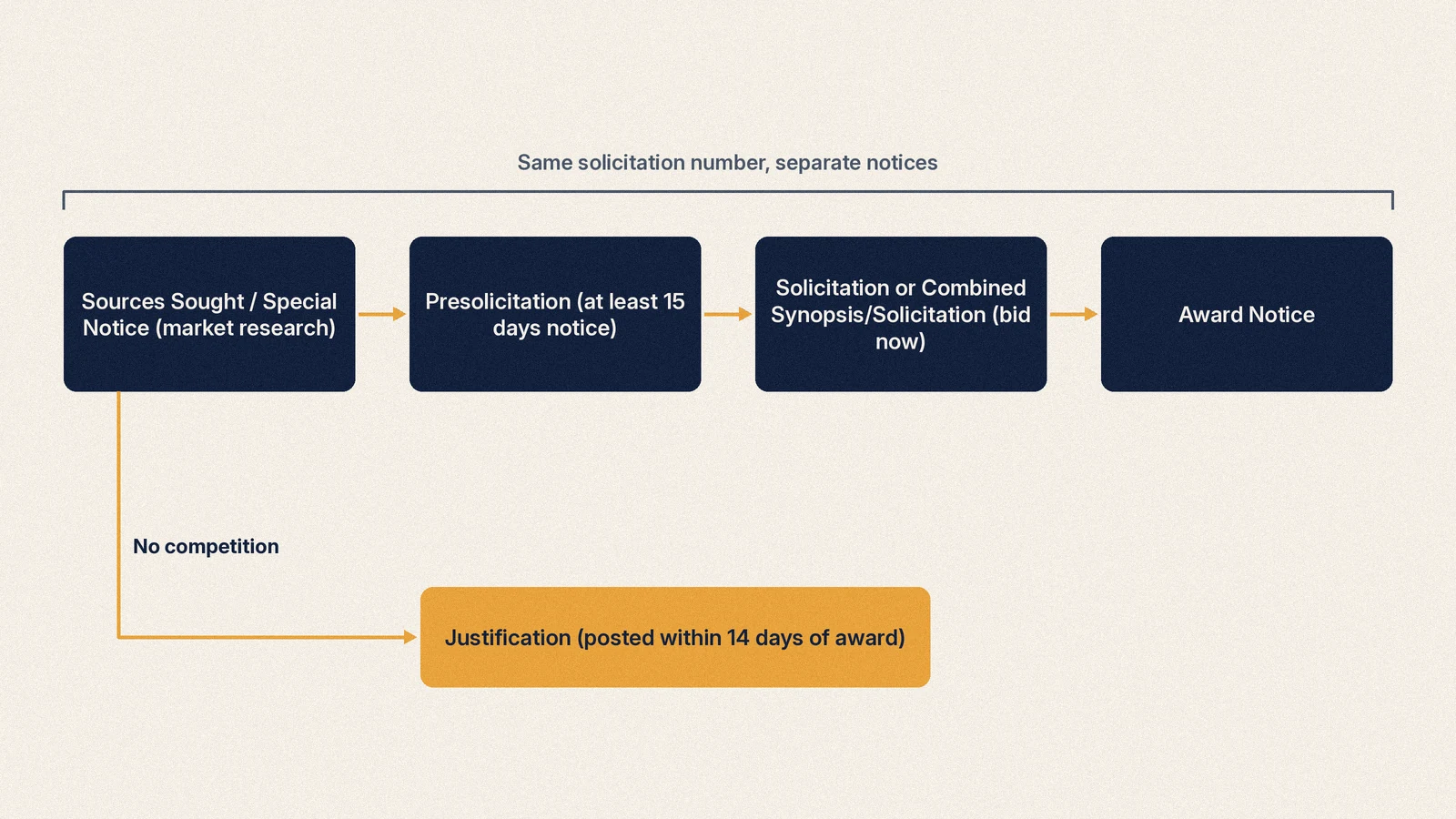
Sources Sought
A sources sought notice is market research. The agency is asking who can do the work, and it is not a request for proposals. It is also your best early lever: SAM.gov's own description of presolicitations notes that responses from capable small businesses help the government decide whether to set a requirement aside. As of 2026-10-07, RFPFinder tracks 698 open sources sought notices. A two-page capability response that mirrors the agency's wording is usually enough.
Special Notice
Agencies use special notices for industry days, pre-bid conferences, long-range estimates, requests for information and draft solicitations or specifications (KB0020252). Draft RFPs posted here are gold: you see the evaluation criteria before the clock starts.
Presolicitation
A presolicitation tells you a solicitation is coming. Under FAR 5.203, agencies generally publish notice at least 15 days before issuing a solicitation. Use the gap to line up teaming partners, pricing and past performance. If the agency enabled an Interested Vendors List, join it.
Solicitation
This is the formal request for bids, quotes or proposals (IFB, RFQ or RFP). FAR 5.203 sets a minimum 30-day response time for most non-commercial actions above the simplified acquisition threshold, and 45 days from the notice for research and development above that threshold. Commercial buys only need "a reasonable opportunity to respond", so windows can be short.
Combined Synopsis/Solicitation
Used for commercial products and services under FAR 12.603, this single notice is both the announcement and the solicitation. No 15-day advance synopsis is required, and the contracting officer sets "a reasonable opportunity to respond". On SAM.gov, combined notices are the largest group of active notices, and many of them close fast.
Award Notice
An award notice names the winner and amount when the agency chooses to post one. Requirements vary by agency, so missing award notices do not mean no award. Use them, together with USAspending.gov, to see who wins in your codes.
Justification
A justification (J&A) explains why an agency contracted without full and open competition. Under FAR 6.305, it is generally posted within 14 days after award and stays up at least 30 days. Read them to learn which incumbents agencies consider irreplaceable, and why.
Intent to Bundle Requirements and Sale of Surplus Property
Intent to Bundle applies to DoD-funded actions and gives 30 days' notice before a bundled solicitation. Sale of Surplus Property covers federal property made available to public bodies. Most vendors can exclude both.
Here is how open notices break down across everything RFPFinder tracks, federal and state and local, as of 2026-10-07:
| Open notices by kind (all levels) | Count |
|---|---|
| Solicitation | 3,993 |
| Combined synopsis/solicitation | 3,062 |
| Presolicitation | 963 |
| Total open | 8,018 |
| Sources sought (tracked separately) | 698 |
Keyword rules that quietly break your results
SAM.gov's keyword search guide (KB0045403) explains three modes, and the differences matter more than most tutorials admit.
- Any Words works like OR. "elevator repair" returns notices with "elevator repair", "elevator" or "repair". It gives the most results and the most noise.
- All Words works like AND, but phrases are split. "engineering service" becomes "engineering" and "service" anywhere in the record.
- Exact Phrase keeps phrases together. Enter each phrase separately and press Enter between them. Do not use commas.
- Abbreviations do not expand. "dept" only matches "dept". If agencies spell it out, so must you.
- Stop words return nothing on their own. Searching "IT" alone fails because "it" is on the stop list. Use "IT operations" or "information technology".
- The Search Editor accepts Boolean logic, for example: (janitorial OR custodial) AND NOT training. Switch modes only after clearing your keywords (KB0017298).
Three habits help. Search the government's words, which you can harvest from the statements of work of past notices in your field. Pair a broad NAICS or PSC prefix with no keyword at all, so you catch notices with vague titles. And keep the National Stock Number or part number style searches for supply notices, where titles are often just an item name.
Saved searches and Follow: what they do and where they stop
SAM.gov gives you two tracking tools, both free with a user account.
- Saved searches store a set of filters. You run a search, choose Actions, then Save, and name it. Saved searches live in your Workspace (KB0029889). To change the criteria, run the saved search, edit the filters and choose Save or Save As (KB0053793).
- Follow tracks one record. Open a notice and select Follow in the upper right. Followed records appear under Followed Records in your Workspace (KB0017560). When an agency cancels a notice, everyone following it is notified (KB0017571).
These were called Search Agents and Watchlist on the old FedBizOpps site (KB0017589). Their limits are worth knowing before you rely on them.
- Email digests, not real-time alerts. You set a default notification frequency in Workspace email settings and can override it per followed record (KB0072680, KB0072125). A change to your general settings overrides per-record choices. With a short response window, a digest can arrive late enough to cost you days.
- No grouping of related notices. A sources sought, presolicitation, solicitation and award for the same buy are often separate notices sharing a solicitation number. Each one hits your saved search on its own. SAM.gov also labels every edit an "Update", and most updates are clarifications or corrections rather than true amendments.
- No document search. Your saved search matches the record. If the scope only appears in the attached PWS, the search never sees it.
- Federal only. State, county, city and school district bids are not on SAM.gov at all.
- One code per notice. A requirement filed under a NAICS you did not pick is invisible to your saved search, however well it fits you.
How to read a notice page and its attachments
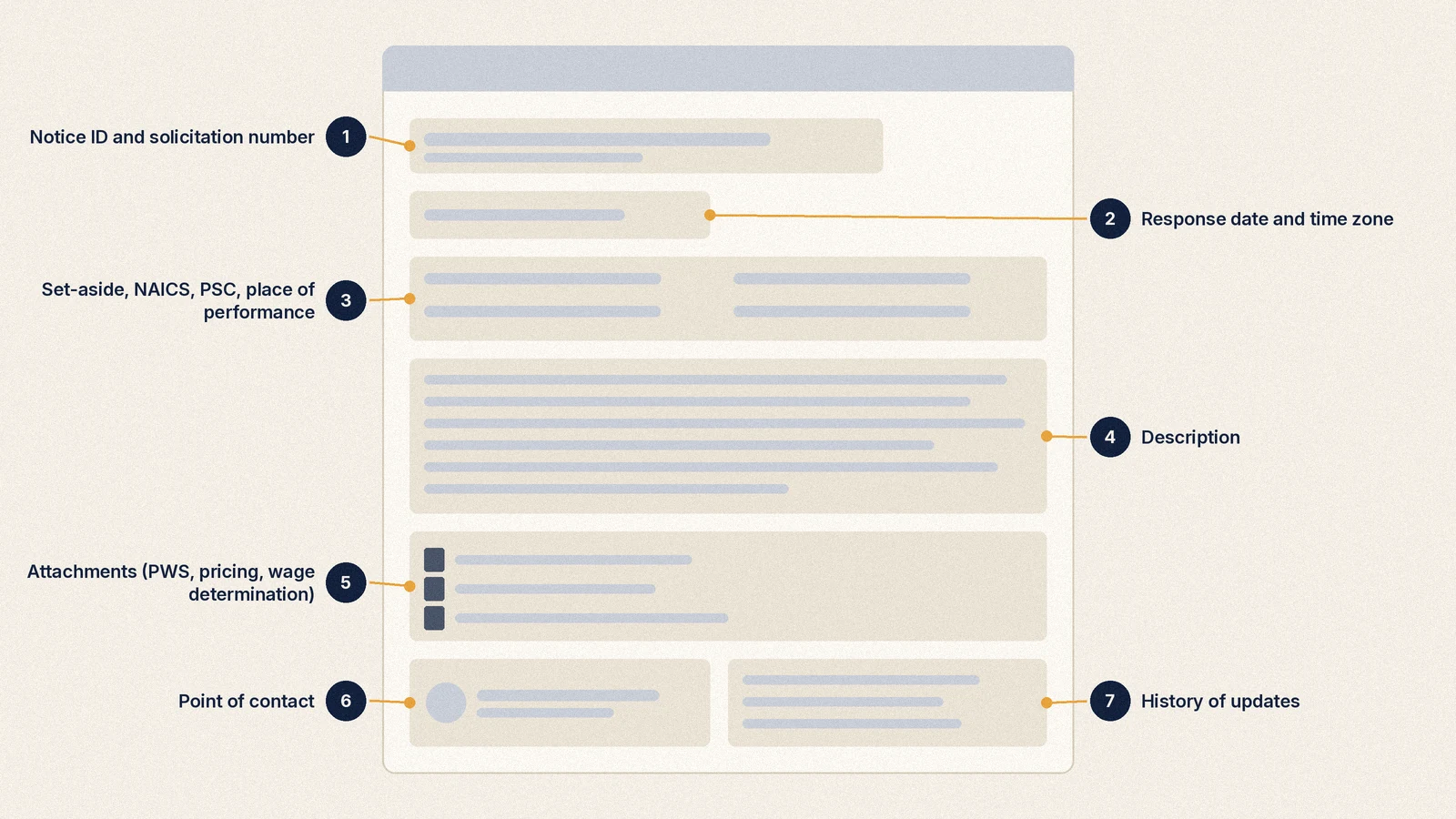
Every notice page has the same skeleton. Read it in this order.
- Notice type, Notice ID and solicitation number. The solicitation number links the presolicitation, solicitation and amendments of the same buy.
- Response date and time zone. Agencies post a time zone with the deadline. Convert it before you plan.
- Classification. Set-aside, NAICS, PSC and place of performance. Under FAR 5.207(d), the contracting officer must identify the set-aside type in both the synopsis and the solicitation, so if the set-aside field and the PDF disagree, ask the contact.
- Description. On combined synopsis/solicitations this is often the whole solicitation, including evaluation factors and submission instructions.
- Attachments and links. This is where the real requirement lives: SF 1449 or SF 33, PWS or SOW, pricing sheet, wage determination, Q&A and amendments. Attachments can be up to 250 MB each (KB0017700).
- Contact information. Questions about a notice go to the point of contact listed on it, not the Federal Service Desk (KB0019603).
- History. Shows each update. Check it before you submit so you acknowledge every amendment.
Controlled attachments
Some attachments show "Controlled" in the Access column. To request them, you need a Contract Opportunities role (Data Entry or Opportunities Administrator) for your entity, and the contracting officer reviews each request (KB0017590, KB0020241). Access is not instant, so request it the day you find the notice.
Documents that are not on SAM.gov at all
Many notices point somewhere else for the documents and for submission. Defense Logistics Agency buys are the biggest example: DLA's DIBBS lets vendors search and respond to RFQs, RFPs and IFBs, and it requires a SAM.gov registration and CAGE code first. As of 2026-10-07, RFPFinder has found 12,624 SAM.gov notices whose documents live on external systems such as DIBBS or NECO, and 2,556 open notices route to DIBBS. Also note that SAM.gov itself does not take proposals. Submit exactly where and how the solicitation says, which is often email or an agency portal.
The SAM.gov API and data extracts
If you are technical, or you have someone who is, SAM.gov's data services let you pull opportunities in bulk instead of clicking (KB0029694).
The Get Opportunities Public API. GSA documents it at open.gsa.gov. The essentials:
- You need an API key, which you generate from your SAM.gov profile.
- postedFrom and postedTo are mandatory, and the range can be at most one year.
- The limit parameter caps at 1,000 records per call.
- Filters include ptype (notice type), ncode (NAICS), ccode (PSC), typeOfSetAside, state, zip, organizationName, solnum and response deadline ranges (rdlfrom, rdlto).
- The description field is a link, and you append your API key to download the text. Attachments come back as resourceLinks.
Daily request limits depend on your account type. GSA's Entity Management API page lists 10 requests per day for a non-federal user with no role, 1,000 for a non-federal user with a role, and more for system accounts. Ten calls a day is enough for a narrow personal feed, not for full coverage.
Data extracts. Under Data Services, Contract Opportunities, SAM.gov publishes ContractOpportunitiesFullCSV.csv. Its folder description says the public data is "collated nightly" as a snapshot, and an Archived Data folder holds files by fiscal year (KB0029693). The CSV is the most practical way to load everything into a spreadsheet or database once a day. It does not include the attachment files themselves.
| Method | Best for | Limits |
|---|---|---|
| Website search | Daily manual review | Results paging stops at 10,000 records; no document search |
| Saved searches and Follow | Light monitoring | Email digests; no grouping of related notices |
| Public API | Targeted automated pulls | API key; one-year date window; daily call limits by role |
| Full CSV extract | Bulk analysis | Nightly snapshot; no attachments |
Common mistakes
- Treating Active as open. Filter on Response/Date Offers Due from today forward, or you will waste time on expired notices and awards.
- Searching one NAICS code. Each notice usually carries one NAICS code, and two agencies can file the same work differently. Search your primary code plus adjacent ones, and add PSC prefixes.
- Using only keywords. Titles like "Brand name parts" or "Base operations" hide the real scope. Keyword searches miss what only the PWS describes.
- Setting a set-aside filter too early. Unrestricted notices are open to you as well. Run one search with your set-aside and one without.
- Ignoring sources sought. Responding is how small businesses influence set-aside decisions. Skipping them hands that influence to someone else.
- Missing amendments. An amended notice can change the due date, the wage determination or the pricing sheet. Check History before every submission.
- Thinking you submit on SAM.gov. You find work on SAM.gov. You submit where the solicitation tells you to.
- Letting registration lapse. You can search without registering, but you need an active entity registration to be awarded.
Why vendors end up on aggregators
SAM.gov is the official source, and it is free. Vendors still add other tools, for four reasons this guide has already shown.
First, the volume. As of 2026-10-07, RFPFinder counts 5,731 open federal notices, and the Defense Logistics Agency accounts for 3,105 of them (54%). If you sell services, most of what a broad search returns is spare parts.
| Agency | Open federal notices, as of 2026-10-07 |
|---|---|
| Defense Logistics Agency | 3,105 |
| Department of the Navy | 1,211 |
| Department of the Army | 425 |
| Department of Veterans Affairs | 199 |
| Department of the Air Force | 183 |
| Public Buildings Service (GSA) | 55 |
| Department of State | 51 |
| Federal Prison System / Bureau of Prisons | 42 |
Second, the clock. Open federal notices give an average of 30.8 days between posting and the due date. But 1,441 of 5,272 notices with both dates (27%) give fewer than 14 days, and 67 give fewer than 7. A digest that lands a day late hurts most on exactly those.
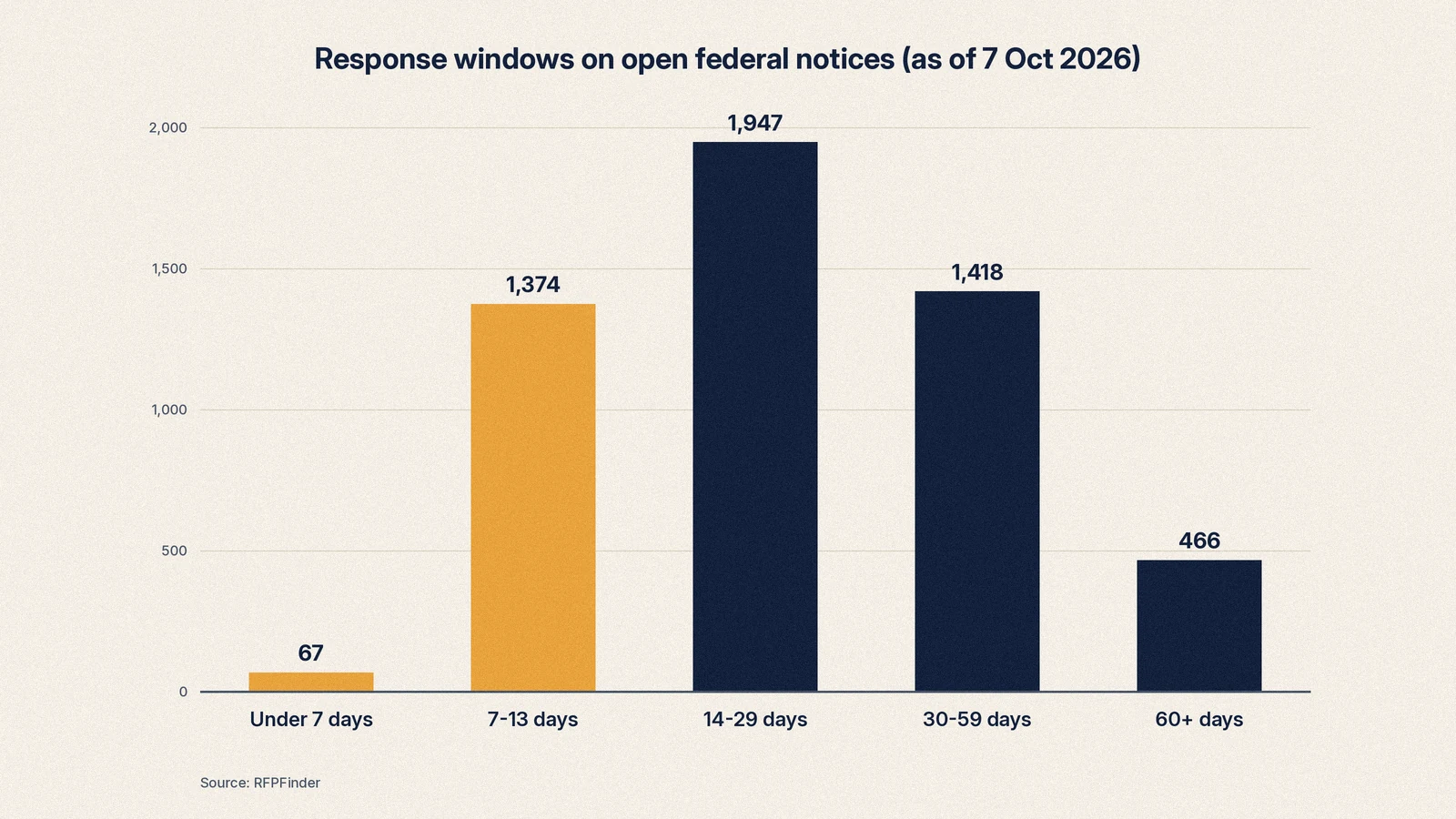
| Response window (posted to due) | Open federal notices |
|---|---|
| Under 7 days | 67 |
| 7 to 13 days | 1,374 |
| 14 to 29 days | 1,947 |
| 30 to 59 days | 1,418 |
| 60 days or more | 466 |
Third, the documents. The detail is in attachments, which SAM.gov does not search, and many attachments sit on other systems. Fourth, coverage: state and local bids are on hundreds of separate portals, not SAM.gov.
Set-asides show why a clear filter matters. As of 2026-10-07, 2,317 of 5,731 open federal notices (about 49% (2,899 of 5,876)) carry a set-aside:
| Set-aside on open federal notices | Count |
|---|---|
| Total small business | 1,844 |
| Service-disabled veteran-owned (SDVOSB) | 251 |
| Women-owned (WOSB) | 126 |
| HUBZone | 81 |
| 8(a) | 20 |
| Veteran-owned (VOSB) | 6 |
| Economically disadvantaged women-owned (EDWOSB) | 5 |
What RFPFinder shows you
RFPFinder reads SAM.gov every day and applies the stricter definition of open: biddable notice types with a response date still ahead. Then it adds what SAM.gov search does not.
- Only open notices. 9,682 open RFPs across federal, state and local sources, with 5,876 from SAM.gov, and no award notices mixed in.
- Searchable documents. As of 2026-10-07, RFPFinder has listed 37,319 attachments, fetched 22,399 and extracted searchable text from 20,325 of them. That means a search can hit words that appear only in a PWS. Where the source requires a login, which is 2,677 documents, we flag it instead of hiding it.
- External document awareness. RFPFinder has identified 12,624 SAM.gov notices whose documents live on DIBBS, NECO or similar systems, so an empty attachment list on SAM.gov does not have to mean a missing requirement.
- Browse by code or category. Start from categories, NAICS codes or PSC codes when you do not yet know the exact terms agencies use.
- State and local in the same feed. See what we cover on the coverage page.
- How we check the data. Our verification method explains how we source and check every notice.
RFPFinder does not replace SAM.gov registration. You still register your entity on SAM.gov to be awarded, and you still submit where each solicitation says. It just makes the search part faster.
Questions
Do I need a SAM.gov account to search contract opportunities?
No. Anyone can search Contract Opportunities without signing in. You need a free login.gov-backed SAM.gov user account to save searches, follow notices and join an Interested Vendors List. Entity registration is a separate step that you only need when you want to be awarded a contract.
What is the difference between SAM.gov entity search and contract opportunities search?
Entity search looks up registered businesses (UEI, CAGE, registration status) and requires you to sign in. Contract Opportunities search looks up procurement notices that agencies post, and it is public. Most people who type 'sam gov search' want the second one.
Why does a SAM.gov notice say Active when the deadline has passed?
Active describes whether a notice has been archived, not whether you can still bid. A notice stays active until its inactive date, and award notices and justifications are active too. Filter on the Response/Date Offers Due range to see only notices you can still answer.
How often does SAM.gov email saved search results?
Notifications are email digests, not instant alerts. SAM.gov lets you set a default notification frequency in your Workspace email settings and change it per followed record, with daily and weekly examples in its help articles. If you need same-day awareness, check your saved searches directly each morning.
Can I search inside SAM.gov attachments?
SAM.gov's keyword guide describes matching words in the record itself, and it does not describe indexing attachment text. Requirements that appear only in a PDF statement of work can be missed by a keyword search. Tools that download and index the documents close that gap.
What is a combined synopsis/solicitation on SAM.gov?
It is a single notice that serves as both the public synopsis and the solicitation, used for commercial products and services under FAR 12.603. It is biddable immediately and the agency does not have to post a separate synopsis 15 days ahead. Read the notice text closely because the instructions and evaluation criteria are often in the description itself.
Should I respond to a sources sought notice?
If the work fits you, yes. A sources sought notice is market research, not a solicitation, and capable small business responses can help the contracting officer decide to set the requirement aside. A short, specific capability response costs little and puts you on the buyer's radar before the solicitation exists.
Is there a SAM.gov API for contract opportunities?
Yes. GSA publishes the Get Opportunities Public API at open.gsa.gov. It requires an API key and a posted date range of up to one year, returns up to 1,000 records per call, and filters by notice type, NAICS, PSC, set-aside, state, ZIP and organization. SAM.gov also publishes a full CSV extract of opportunities that is collated nightly.
Related guides
- How to find RFPs (and government contracts) without paying for a database8 min read
- Government contracts for small business: how to get started9 min read
- Set-aside certifications: 8(a), HUBZone, SDVOSB, WOSB7 min read
- RFP vs RFQ vs RFI (and IFB, sources sought and more)6 min read
- How to write an RFP response that gets scored9 min read
- Bid Tabulations and Bid Results: Who Bid, Who Won and at What Price17 min read
- CAGE code lookup, UEI lookup and DUNS: find, read and use all three IDs16 min read
- DIBBS explained: how DLA bids, automated awards and approved sources work17 min read
- DoD contracts: the buying commands, where they post, and how small firms win16 min read
- "GSA Schedule Contracts in 2026: What MAS Is, Who Should Apply, How Orders Flow"17 min read
- How to Bid on Government Contracts: From Zero to a Submitted Bid18 min read
- Sources sought notices: the cheapest way to shape a federal contract16 min read